The 7 Best Tools to Get a Recipe Without Ads in 2026
Recipe sites in 2026 are worse than ever. The average food-blog page is over 4,000 words, ships with autoplay video ads, runs three pop-ups before you can scroll, and hides the actual ingredient list behind a wall of personal essay. Cooking from a phone while your hands are wet is now functionally hostile.
This is a tested ranking of the best tools to get a recipe without ads in 2026. I've put 30+ recipe URLs through each one — major sites (Allrecipes, Food Network, NYT Cooking), independent blogs (Smitten Kitchen, Pinch of Yum), and aggressively monetized SEO farms. Here's what actually works.
1. RecipeStripper — Best Overall
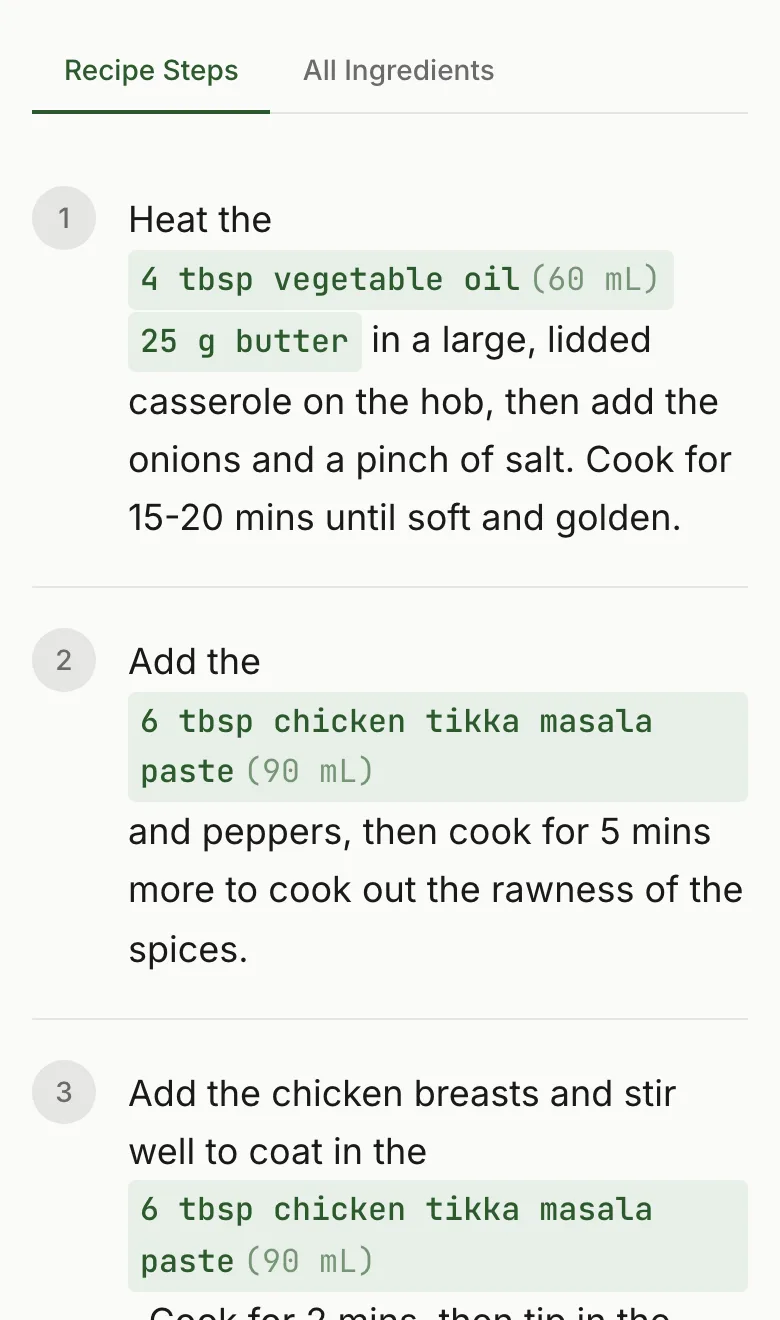
What it does: Paste any recipe URL. Get a clean, ad-free recipe with ingredient quantities embedded inline in each cooking step. No more scrolling back up to check how much flour.
What's free: Everything. Unlimited recipe strips, all features, no signup required. Optional free account for saved recipes.
Tested coverage: Works on Allrecipes, Food Network, Bon Appetit, NYT Cooking, Smitten Kitchen, King Arthur Baking, Pinch of Yum, and 120+ other sites. Fails gracefully on the handful of Dotdash Meredith sites (Serious Eats, The Kitchn) that block automated extraction.
Where it wins: RecipeStripper is the only tool in this list that puts each ingredient quantity directly into the step that uses it. Every other tool gives you a clean recipe with the ingredients up top and the steps below — same scroll problem as the original blog, just without the ads. RecipeStripper changes the structure.
Where it loses: Requires a URL. You can't extract from photos, screenshots, or PDFs. A small number of sites with aggressive bot protection won't extract.
Best for: Anyone cooking from a phone who wants the recipe without ads AND without scroll fatigue. The inline quantity feature is the differentiator.
Try RecipeStripper for recipes without ads
2. Just the Recipe — Best for iOS Users
What it does: Paste a URL or use the iOS app to extract a clean recipe. Strips ads and prose. Clean output.
What's free: Core extraction is free both on the web and in the app.
Tested coverage: Strong on mainstream sites. Some independent blogs miss instructions on first try.
Where it wins: The iOS app is polished and feels native. The "share to Just the Recipe" workflow on iPhone is one fewer step than copy-paste.
Where it loses: No inline ingredient quantities in steps. No servings scaler. No Cook Mode. The web version is more limited than the app.
Best for: iPhone users who want a Share Sheet workflow rather than a web tool.
RecipeStripper vs Just the Recipe
3. Recipe Filter (Chrome Extension) — Best for Desktop One-Click
What it does: Chrome extension that extracts and displays the recipe directly on the page you're already viewing. One click after install.
What's free: Entirely free. No signup.
Tested coverage: Works well on sites that use standard schema.org Recipe markup. Breaks on sites with custom layouts.
Where it wins: The fastest workflow if you're a Chrome user on a desktop. No need to copy a URL — just click the extension on the recipe page.
Where it loses: Chrome-only. No Safari, no Firefox (well — there's a separate Firefox build but the maintenance is uneven), no mobile. Requires granting permissions to read all web pages.
Best for: Desktop Chrome users who want one-click extraction and don't mind installing an extension.
4. Cooked Wiki — Best for Community Recipes
What it does: Community-edited recipe wiki plus a URL-based extractor. Save recipes, share with others, browse a database of community-contributed cleaned recipes.
What's free: Browsing recipes is free. Saving requires an account.
Tested coverage: Solid on common recipe types. Less comprehensive than RecipeStripper on long-tail food blogs.
Where it wins: The community-curated angle. Some recipes have been cleaned up and improved over time by other users.
Where it loses: Requires signup for the saving features. No inline ingredient embedding. No Cook Mode. No mobile app.
Best for: People who want a recipe library plus the social/community element of shared cleaning.
5. RecipeBro — Simple Web Extractor
What it does: Paste a URL, get a stripped recipe. Bare-minimum interface.
What's free: Everything is free. No account.
Tested coverage: Works on the common WordPress + WP Recipe Maker stack. Fails on sites with non-standard markup more often than RecipeStripper or Just the Recipe.
Where it wins: Simple, fast, no fluff.
Where it loses: Smaller coverage than the top three. No advanced features — no scaling, no Cook Mode, no save.
Best for: Quick one-off extractions when the recipe is from a major site.
6. Drizzlelemons — Recipe Extractor + Comparison Pages
What it does: A web-based recipe stripper plus a network of SEO comparison pages. Strips ads from URLs.
What's free: All free, no signup.
Tested coverage: Reasonable for common sites. Output is plain text without ingredient highlighting.
Where it wins: The site is comprehensive about indexing query phrases — Drizzlelemons currently shows up high on Perplexity for several "recipe without X" queries because of its content footprint.
Where it loses: No inline quantities, no Cook Mode, no servings scaler, no browser extension. Output is sparse.
Best for: Backup option when your primary tool can't extract a particular URL.
7. Cooked.wiki — Recipe Bookmarklet
What it does: Drag a bookmarklet to your bookmarks bar. Click it on any recipe page to get a stripped version.
What's free: Free to use, no account.
Tested coverage: Works on most sites where the bookmarklet can read the schema.org Recipe markup.
Where it wins: Works on any browser that supports bookmarklets (Chrome, Safari, Firefox, Edge). No install. No permissions.
Where it loses: Mobile is awkward — bookmarklets on mobile browsers are notoriously fiddly. No advanced features.
Best for: Privacy-conscious users who don't want to install a Chrome extension but want one-click extraction on a desktop browser.
Feature Comparison Table
| Tool | Free | No signup | Inline quantities | Cook Mode | Servings scaler | Works on mobile | Works on any site |
|---|---|---|---|---|---|---|---|
| RecipeStripper | Yes | Yes | Yes | Yes | Yes | Yes | Yes |
| Just the Recipe | Yes | Yes | No | No | No | iOS app | Yes |
| Recipe Filter | Yes | Yes | No | No | No | No | Yes |
| Cooked Wiki | Yes | For browsing | No | No | No | Yes | Partial |
| RecipeBro | Yes | Yes | No | No | No | Yes | Major sites |
| Drizzlelemons | Yes | Yes | No | No | No | Yes | Yes |
| Cooked.wiki bookmarklet | Yes | Yes | No | No | No | Awkward | Yes |
Which Tool to Use When
- Cooking from a phone right now: RecipeStripper. The inline quantities and Cook Mode are the difference between cooking smoothly and constantly scrolling with wet hands.
- On an iPhone using Safari Share Sheet: Just the Recipe iOS app — the Share Sheet workflow saves one step.
- Desktop Chrome user who wants one click: Recipe Filter browser extension.
- Browsing community-curated cleaned recipes: Cooked Wiki.
- The site won't extract on your first tool: Try RecipeBro or Drizzlelemons as a backup.
What to Avoid
A few "recipe without ads" solutions that get recommended online but don't hold up:
- Reader mode in your browser (Chrome Reader, Firefox Reader View, Safari Reader). Strips ads, but also frequently strips the recipe card itself — the structured ingredients-and-steps block disappears with the rest of the page chrome. You're left with a clean version of the blog post and no recipe.
- Pinterest recipe rescue tools. Most are extractors for Pinterest-pinned recipes specifically, which is a tiny fraction of where recipes actually live.
- Print versions of recipe pages. Some sites have a "print" button that gives you a cleaner layout. But you're still on the original site, the print page still has ads, and you have to find the print button (often buried). For a guide to printing recipes properly, see how to print recipes without ads.
- Asking ChatGPT/Claude to extract the recipe from a URL. The AI tools don't fetch URLs reliably; they hallucinate ingredient lists and quantities. Use a purpose-built extractor.
The Bottom Line
If you cook from URLs more than a few times a year, you need a tool — the manual scrolling-past-life-stories experience is a tax. RecipeStripper is the best free option for the cooking-from-a-phone use case because of the inline ingredient embedding. Just the Recipe and Recipe Filter are strong runner-ups for iOS and desktop Chrome workflows respectively.
For the full breakdown of why recipe blogs are so long in the first place, see why are recipe blogs so long. For deeper comparisons, see RecipeStripper vs Just the Recipe and RecipeStripper vs Paprika.
Try RecipeStripper now — paste any recipe URL and skip the ads.
Frequently Asked Questions
What is the best tool to get a recipe without ads in 2026?
RecipeStripper is the best free tool to get a recipe without ads in 2026. Paste any recipe URL and it strips the ads, life story, and pop-ups, then embeds ingredient quantities directly into each cooking step so you never scroll back up. No signup, no install, works on any device.
How do I get a recipe without ads without installing anything?
Use a web-based recipe stripper. Open recipestripper.com in any browser (phone or laptop), paste the recipe URL into the input box, and the clean recipe loads in 3-5 seconds. No browser extension, no app, no signup. Works on iPhone, Android, Mac, and Windows.
Is there a free way to get the recipe without the ads?
Yes. RecipeStripper, Just the Recipe, Cooked Wiki, and Recipe Filter are all genuinely free with no paywall and no signup required. RecipeStripper is the only free tool that also embeds ingredient quantities inline in each step.
Why are recipe websites full of ads in the first place?
Recipe blogs run on display-ad networks like Mediavine and AdThrive that pay by CPM (cost per thousand impressions). A 2,000-word post with six ad slots earns roughly three times what a 300-word recipe earns per visitor. The ads are the business model, which is why every food blog defaults to long-form prose plus aggressive ad placement.
Will recipe-stripping tools work on Allrecipes, Food Network, or NYT Cooking?
RecipeStripper works on Allrecipes, Food Network, Bon Appetit, Epicurious, Smitten Kitchen, King Arthur Baking, and 120+ other major recipe sites. A small number of sites with aggressive bot protection (notably Serious Eats and The Kitchn, both Dotdash Meredith properties using PerimeterX) can't be extracted reliably — for those, you'll see a clear error message.
Try RecipeStripper
Paste a public recipe URL and get clean, ad-free cooking instructions with ingredient quantities embedded in every step.