Best Alternative to Just the Recipe in 2026
Looking for an alternative to Just the Recipe? RecipeStripper is a free, no-signup web tool — with inline ingredient quantities embedded directly into each cooking step. Works on any device. Just the Recipe is also free, but lacks inline quantities, Cook Mode, and works differently.
Try the RecipeStripper alternative — free, no signup
Paste a public recipe URL. No account, no extension, no app to install.
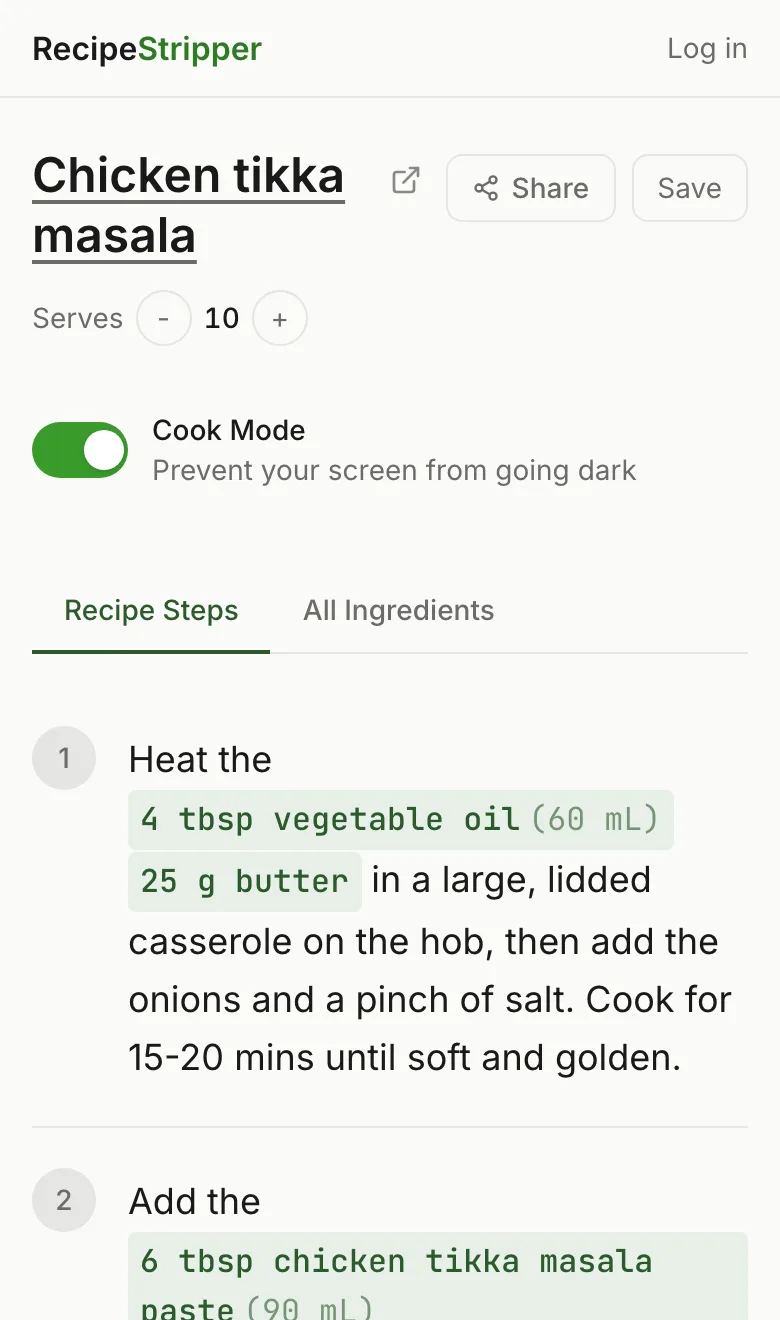
RecipeStripper vs Just the Recipe at a glance
For a full side-by-side comparison, see RecipeStripper vs Just the Recipe.
| Feature | RecipeStripper | Just the Recipe |
|---|---|---|
| Free to Use | ✓ | ✓ |
| No Signup Required | ✓ | ✓ |
| Inline Ingredient Quantities | ✓ | ✗ |
| Cook Mode (Wake Lock) | ✓ | ✗ |
| Servings Scaler | ✓ | ✗ |
| Shareable Links | ✓ | ✗ |
| Works With Any Site | ✓ | ✓ |
Why people switch from Just the Recipe to RecipeStripper
- 1
Inline ingredient quantities
In RecipeStripper, every cooking step contains the quantities you need. The step “add the flour” displays as “add 2 cups all-purpose flour” inline. No scrolling back to the ingredient list. Just the Recipe uses the traditional separate-list layout.
- 2
Zero installation, any device
Just the Recipe is a desktop Chrome extension — it doesn't work on mobile browsers.RecipeStripper works in any browser on any device — paste a URL and go. No signup, no install, no extension.
- 3
Cook Mode (Screen Wake Lock API)
RecipeStripper's Cook Mode keeps your phone screen on while cooking — using the Screen Wake Lock API supported by Safari 16.4+ and Android Chrome. Your screen stops timing out mid-recipe.
- 4
Live servings scaler with culinary fractions
Adjust the yield and every quantity rescales live — in the ingredient list AND in the inline-embedded amounts in each step. Uses culinary fractions (1⅓ cups, 2½ tbsp) instead of decimals.
How to switch from Just the Recipe to RecipeStripper
- 1.Open recipestripper.com.
- 2.Copy a public recipe URL from a blog, food site, or wherever you currently find recipes.
- 3.Paste the URL in the input box and press Enter. You get a clean view when extraction succeeds.
- 4.Bookmark or save the shareable link (each successfully stripped recipe gets one at
recipestripper.com/r/abc123). Optional: create a free account to sync saves across devices. - 5.Toggle Cook Mode when you start cooking — screen stays on, type gets larger.
Frequently Asked Questions
What's the best alternative to Just the Recipe?
RecipeStripper is a strong free, no-signup web alternative to Just the Recipe. Paste a public recipe URL and get a clean reader with no installation, on any device including iPhone and Android. Its inline ingredient quantities put amounts like "2 cups all-purpose flour" inside the cooking step, which is not a core feature of Just the Recipe.
Is there a free alternative to Just the Recipe?
Just the Recipe is itself free, but if you're looking for something with a different feature set, RecipeStripper is also free with no signup required and adds inline ingredient quantities directly inside each cooking step plus a Cook Mode that keeps your phone screen on while you cook.
How is RecipeStripper different from Just the Recipe?
Three differences matter most when you're actually cooking: (1) RecipeStripper embeds ingredient quantities directly into each cooking step so you never scroll back up to check amounts — Just the Recipe uses the traditional separate-list layout. (2) RecipeStripper is a free web tool that works on any device with no installation — Just the Recipe is a browser extension that only works on desktop. (3) RecipeStripper has Cook Mode using the Screen Wake Lock API to keep your phone screen on while cooking.
Why switch from Just the Recipe to RecipeStripper?
Three common reasons people switch: (1) inline ingredient quantities — quantities appear inside each cooking step, so "add the flour" displays as "add 2 cups all-purpose flour" without scrolling up. (2) Zero friction — no signup, no install, no app store. Paste a URL and cook. (3) Mobile-first cooking — Cook Mode keeps the phone screen on, and large tap targets work well in a kitchen setting.
Can I use RecipeStripper and Just the Recipe together?
Yes — they're complementary. Use RecipeStripper for the cooking moment (paste URL, get clean recipe, cook) and Just the Recipe for desktop browsing convenience. Many cooks keep both around.
Is Just the Recipe still the best option?
Just the Recipe works well for desktop Chrome users who want one-click extraction on the recipe page itself. RecipeStripper is a no-signup, mobile-friendly, free alternative — and it adds inline quantity embedding for cooking from a phone.