Recipe Without Pop-ups
No newsletter modals, no cookie banners, no video overlays. Paste a public recipe URL and get straight to cooking.
Try it now — free, no signup
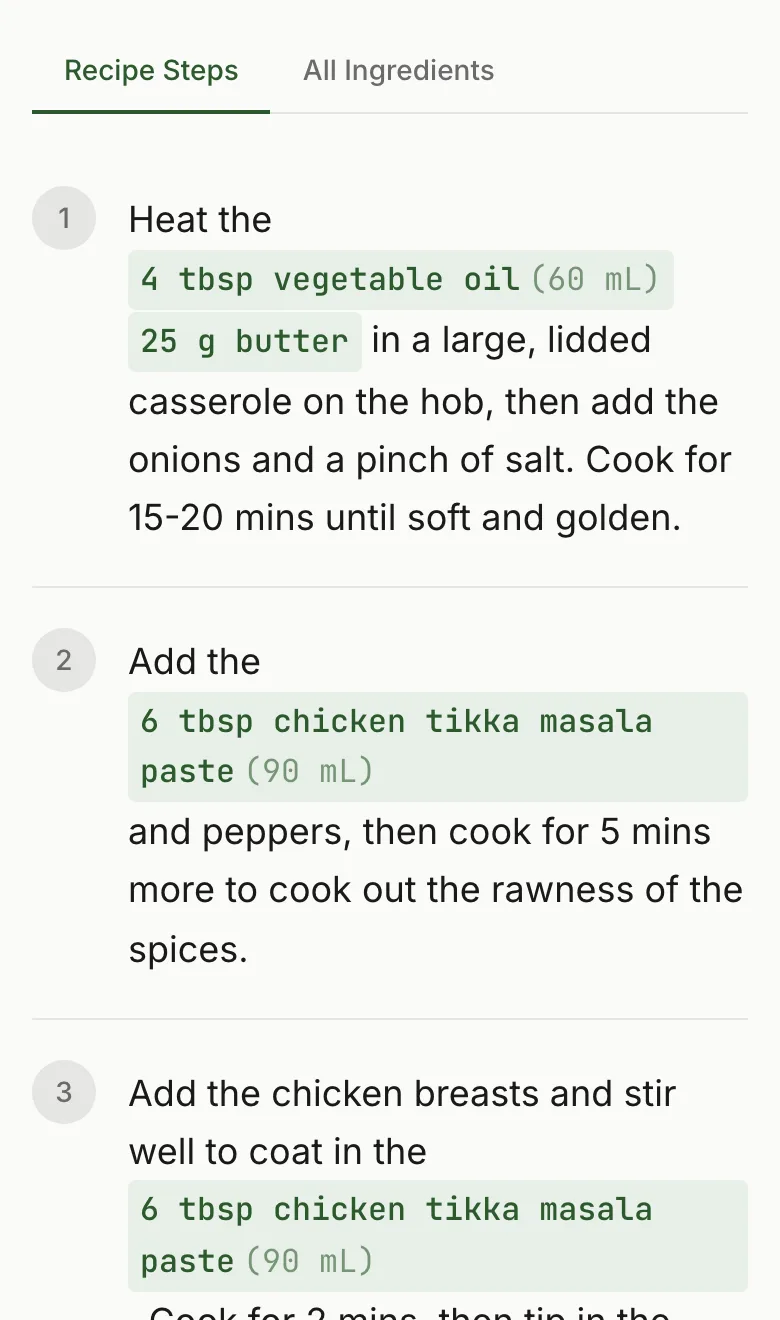
A Catalog of Recipe Site Interruptions
Modern recipe sites layer interruptions on top of each other in ways that would seem satirical if they weren't real. Here's what a typical recipe page visit looks like:
The Cookie Banner
You arrive at the page. Before you can read a single word, a large modal or banner covers the bottom third of the screen asking you to consent to tracking cookies. On mobile, this often covers half the viewport.
The Newsletter Pop-up
Five seconds in — or sometimes immediately — a full-screen modal appears offering you a free recipe ebook or weekly newsletter in exchange for your email. There's an 'X' to close it, but it's small and often styled to blend into the background.
The Auto-play Video
Somewhere mid-page, a video player activates. It starts playing a cooking demonstration with sound. On desktop it may be sticky, following you down the page so it stays visible (and earns CPM impressions) as you scroll.
The Push Notification Request
A browser-native dialog box appears asking whether you want to receive push notifications from the site. This is the browser's own UI, which can't be easily dismissed without clicking.
The Exit-Intent Overlay
When your mouse moves toward the top of the browser (to navigate away), a full-screen 'Wait! Don't leave!' modal appears with another offer. On mobile, this often triggers when you switch apps.
On a bad site, all of these can fire in sequence during a single recipe visit. RecipeStripper eliminates them by extracting the recipe data on its own servers and displaying it on a completely clean page.
Why Pop-ups Are Especially Bad for Cooking
Pop-ups are annoying on any website, but they're particularly hostile during cooking. When you're mid-recipe — your hands covered in ground beef, your eyes moving between the screen and the stove — an unexpected full-screen modal can literally cause you to make a mistake. You lose your place in the steps. You can't dismiss the popup without touching your phone. Your timer is buried under the overlay.
The cooking context demands uninterrupted access to information. A recipe page is functional documentation, not content to be browsed. Pop-ups treat it like content.
RecipeStripper's clean recipe viewer also includes Cook Mode — a dedicated display that keeps your screen awake and removes any possibility of interruption while you're actively working through a recipe.
How RecipeStripper Solves It
The typical approach to escaping pop-ups is browser extensions that try to dismiss or block them. These work inconsistently because pop-up scripts update constantly to evade ad blockers.
RecipeStripper takes a fundamentally different approach. It fetches the recipe page server-side, extracts the structured recipe data from the HTML, and serves you a rebuilt page that only contains the recipe. There is no pop-up code to run because you're not on the original site.
The result is a clean, fast-loading page with your ingredients and instructions. No JavaScript pop-up libraries. No video players. No cookie tracking. No email capture. Just the recipe, formatted for cooking.
Beyond Just Removing Pop-ups
RecipeStripper's clean display adds features the original page almost never has:
- ✓Ingredient quantities embedded inline in each step — no scrolling back to check amounts
- ✓Servings scaler that adjusts all quantities live
- ✓Cook Mode (Wake Lock API) that keeps your screen awake without being touched
- ✓Save any recipe to your account for offline access
Frequently Asked Questions
Why do recipe sites show so many pop-ups?
Recipe sites use pop-ups primarily to grow their email lists and comply with privacy laws. Newsletter subscriptions are a key revenue source for food bloggers — a large email list can generate thousands of dollars per month through sponsored content and affiliate promotions. Cookie consent banners are legally required in the EU and increasingly expected elsewhere. The pop-ups aren't accidental; each one exists because it moves a measurable business metric.
Does RecipeStripper block pop-ups?
RecipeStripper doesn't block pop-ups — it goes a step further. Rather than fighting a site's pop-up logic, RecipeStripper extracts the recipe data on its servers and displays it on a completely separate, clean page. There are no pop-ups because RecipeStripper's own pages have none. You're not on the original site at all.
What types of pop-ups appear on recipe sites?
The most common are: newsletter subscribe modals (typically triggered after 5–10 seconds or on scroll depth), cookie consent banners (required by GDPR and CCPA), exit-intent overlays that appear when your mouse moves toward the browser bar, push notification permission requests, and sticky 'Download Our App' banners. Mobile users often get additional interstitials. RecipeStripper's clean display has none of these.
Can I save recipes I find through RecipeStripper?
Yes. Free accounts can save recipes to a personal library and access them later from any device. Saved recipes are stored with the clean, ad-free display intact — no need to re-strip the URL each time you want to cook something you've made before.