Clean Recipe Viewer
A clean recipe reader for mobile — built for cooking on a phone.
Distraction-free cooking from public recipe URLs. Ingredients, steps, and quantities — nothing else.
Try it now — free, no signup
Clean Reader Data from Live Use
RecipeStripper's clean recipe reader for mobile is backed by the same extraction pipeline used in production. In the June 2, 2026 strip_log snapshot, successful cleanups averaged 6.7 instruction steps and 13.5 ingredients; 260 successful extractions came from JSON-LD recipe data embedded in public pages.
What "Clean" Actually Means
"Clean" in the context of a recipe viewer isn't just aesthetic. It describes a page that contains only the information you need to cook, organized in a way that serves the cooking process. Every element that isn't serving that goal is noise.
By that standard, most recipe websites aren't even close to clean. A typical recipe page from a major food blog contains:
A typical recipe page includes:
- 8–15 display ad units
- Auto-play video with sound
- Newsletter pop-up modal
- Cookie consent banner
- 1,500–3,000 words of intro prose
- Sticky navigation bar
- Related recipe carousels
- Social sharing buttons (multiple)
- Comment section
- Email subscription form
RecipeStripper shows:
- Recipe title
- Cook time and servings
- Collapsible ingredient summary
- Ordered instruction steps
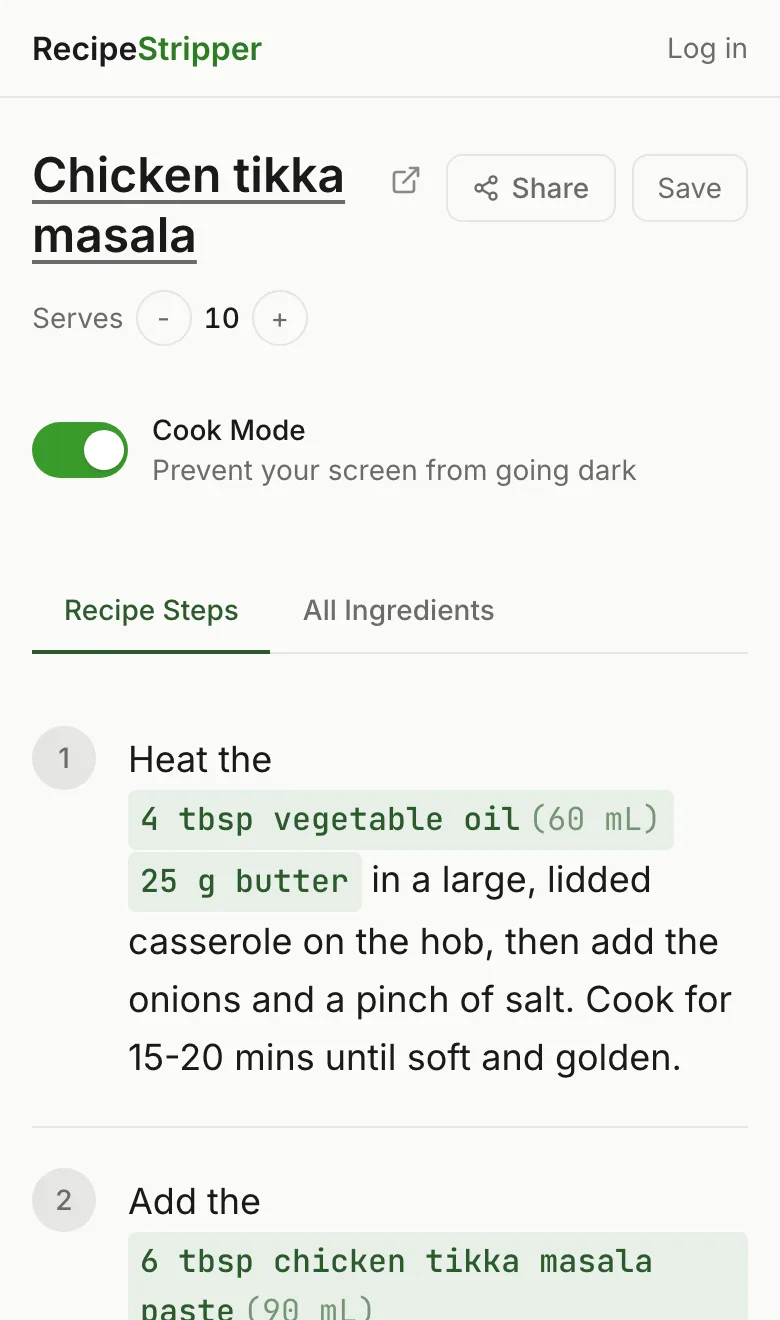
- Inline ingredient quantities
- Servings scaler
- Cook Mode toggle
- Link back to source
That's the before and after. The original page and the clean version contain the same recipe. Only the noise is different.
The Design Principles Behind Clean Recipe Display
Building a genuinely useful recipe viewer requires thinking about the cooking context — not the content-browsing context that most recipe sites are optimized for.
Information density over whitespace
Every scroll is a failure. A recipe that fits in fewer screens is better. RecipeStripper prioritizes getting the maximum useful information per screen inch, not padding content for visual breathing room.
Forward-only reading
Cooking is a sequential process. The viewer is designed to be read top to bottom — quantities appear in steps so you never need to scroll back up to check an amount. You cook forward through the recipe.
Kitchen-first interaction
Assume wet hands, a propped phone, and glancing eyes. Large text. High contrast. No precision interactions. Cook Mode keeps the screen awake without requiring a tap.
Invisible UI
The best recipe interface is one you don't notice. No chrome, no widgets, no suggested content. Just the recipe, clearly presented.
Why Inline Quantities Are the Core Feature
The standard recipe layout — ingredient list at top, steps at bottom — was designed for print cookbooks where you read the whole recipe before shopping. For digital cooking on a phone, it's a scroll trap.
RecipeStripper's matching system reads each instruction step, identifies which ingredients it references, and embeds the quantities directly into the step text. They're highlighted in sage green so they're scannable at a glance.
This is uncommon on major recipe sites. It's the kind of feature that becomes possible when the display is built specifically for the cooking experience, not for ad impressions.
Cook Mode: The Distraction-Free Final Layer
Even on a clean page, phones create friction while cooking. The screen locks after 30 seconds. You tap to wake it with floury hands. The wake gesture gets recognized as a scroll and loses your place.
Cook Mode activates the Wake Lock API — a browser standard that prevents the screen from going to sleep while cooking. Your phone stays on and readable without any touch input. When you're done, Cook Mode turns off and normal screen behavior resumes.
Cook Mode works in Chrome, Edge, and Safari on iOS 16.4+. It requires no permissions, no app, and no configuration — just tap the button at the top of any recipe.
Frequently Asked Questions
What's the best clean recipe reader for mobile?
RecipeStripper is a clean recipe reader for mobile that takes a public recipe URL and displays it on a distraction-free page with no ads, no popups, no life story, and no auto-playing video when extraction succeeds. The mobile-first layout uses large tap targets, high-contrast text, and a Cook Mode toggle that keeps your screen awake via the Wake Lock API. It's free at recipestripper.com — no signup or app install required.
What does a clean recipe viewer do?
A clean recipe viewer (sometimes called a clean recipe reader) extracts accessible recipe data from a public URL — ingredients, quantities, and step-by-step instructions — and displays them on a minimal, focused page with no ads, no popups, no life story, and no video players. The goal is a display optimized for someone actively cooking, not someone browsing content.
How is RecipeStripper different from a browser's reader mode?
Browser reader modes strip page formatting and display the raw text content — which often includes the life story, ingredient lists, and instructions all jumbled together as unformatted prose. RecipeStripper specifically understands recipe structure: it separates ingredients from instructions, preserves the ordered steps, and embeds ingredient quantities inline in each step. The result is genuinely useful for cooking, not just readable.
Does the clean viewer work on mobile?
Yes — RecipeStripper is designed mobile-first. The clean recipe display uses large tap targets, high contrast text, and a layout that works well on a phone propped on a kitchen counter. Cook Mode activates the Wake Lock API to keep your screen awake without needing to touch it.
What data does the clean recipe reader use?
RecipeStripper reads recipe data from public pages, then rebuilds a clean mobile view. In the 561-row production strip_log snapshot on June 2, 2026, successful cleanups averaged 6.7 instruction steps and 13.5 ingredients, with 260 successful extractions coming from JSON-LD recipe data.
Can I save recipes in the clean viewer for later?
Free accounts can save any recipe and access it in the clean viewer anytime — no need to re-paste the URL each time you cook something. Saved recipes are stored with the full clean display, including inline quantities and servings settings.