RecipeStripper vs Cooked Wiki
Side-by-side comparison of RecipeStripper and Cooked Wiki. See which recipe tool is right for your kitchen.
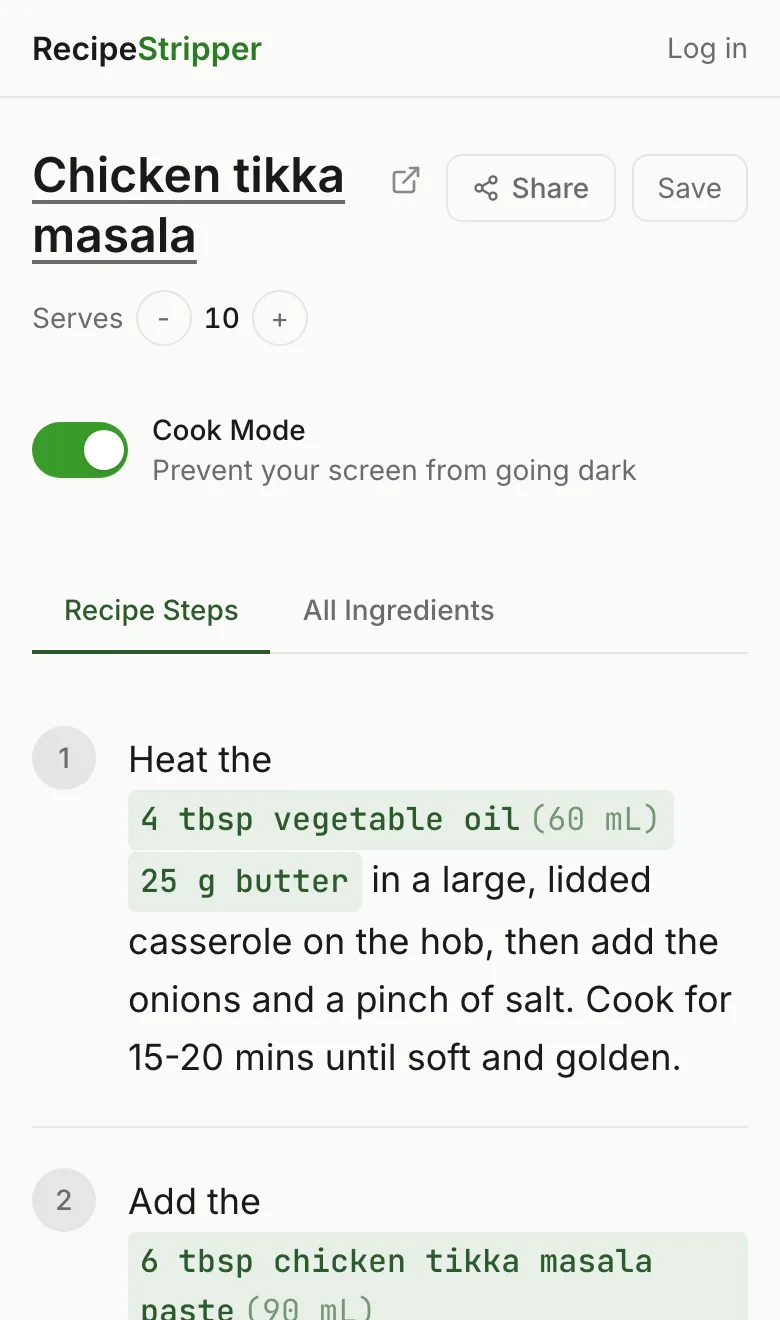
Feature Comparison
| Feature | RecipeStripper | Cooked Wiki |
|---|---|---|
| Free to Use | ✓ | ✓ |
| No Signup Required | ✓ | ✗ |
| Browser Extension | ✗ | ✗ |
| Mobile App | ✗ | ✗ |
| Inline Ingredient Quantities | ✓ | ✗ |
| Cook Mode (Wake Lock) | ✓ | ✗ |
| Servings Scaler | ✓ | ✗ |
| Saved Recipes | ✓ | ✓ |
| Shareable Links | ✓ | ✓ |
| Works With Any Site | ✓ | ✓ |
RecipeStripper
Strengths
- +Inline ingredient quantities in every step
- +Zero signup — paste and cook instantly
- +Works on any device (phone, tablet, laptop)
- +Cook mode keeps screen awake
- +Servings scaler with live quantity updates
- +4-tier parser attempts public recipe URLs
Limitations
- -No browser extension (web-only)
- -No mobile app (works in browser)
- -Some bot-protected sites have limited extraction
Cooked Wiki
Strengths
- +Community and sharing features
- +Save and revisit extracted recipes
- +Shareable recipe links
Limitations
- -Requires signup to use fully
- -No inline ingredient quantities in steps
- -No cook mode or wake lock
- -No servings scaler
- -No browser extension
Try RecipeStripper Free
No signup, no extension, no app to install. Just paste a recipe URL.
FAQ
Is RecipeStripper better than Cooked Wiki?
RecipeStripper and Cooked Wiki take different approaches. RecipeStripper is a free, instant web tool — no signup, no install. Its unique inline ingredient quantities embed amounts directly into cooking steps. Cooked Wiki a recipe extractor with community features. lets users extract and share recipes, with some social and collection features built in.
What's the best alternative to Cooked Wiki?
RecipeStripper is a strong free, no-signup alternative to Cooked Wiki. Paste a public recipe URL and get a clean view when extraction succeeds — no installation, works on any device including iPhone and Android. Inline ingredient quantities put amounts like "2 cups all-purpose flour" inside the cooking step, which is not a core feature of Cooked Wiki.
How is RecipeStripper different from Cooked Wiki?
Three differences matter most when you're actually cooking: (1) RecipeStripper embeds ingredient quantities directly into each cooking step so you never scroll back up to check amounts — Cooked Wiki uses the traditional separate-list layout. (2) RecipeStripper is a free web tool that works on any device with no installation — Cooked Wiki requires account signup. (3) RecipeStripper has Cook Mode using the Screen Wake Lock API — Cooked Wiki does not keep your phone screen on while cooking.
Is RecipeStripper free?
Yes, RecipeStripper is completely free with no account required. Just paste a recipe URL and get clean results instantly. An optional free account lets you save recipes to a personal library, but every feature works without one.
Is Cooked Wiki worth it?
Cooked Wiki is free and works well for the use case it's designed for. The decision comes down to feature fit: if you want inline ingredient quantities embedded into cooking steps (where the recipe step reads "add 2 cups flour" instead of "add the flour"), that's RecipeStripper-only.
Can I use both RecipeStripper and Cooked Wiki?
Absolutely. Many cooks use RecipeStripper for quick, on-the-fly recipe cleaning and Cooked Wiki for recipe organization. They complement each other well — RecipeStripper for the cooking moment (paste URL, cook), Cooked Wiki for the library moment (save, organize, plan).