The 7 Best Recipe Extractors in 2026
A recipe extractor parses a recipe URL and returns the structured ingredients and instructions, stripping the ads, prose, and pop-ups. The best ones handle the wide variability in how food blogs structure their data — from clean schema.org markup (easy) to custom HTML soup (hard) to aggressively bot-blocked Dotdash Meredith properties (currently impossible).
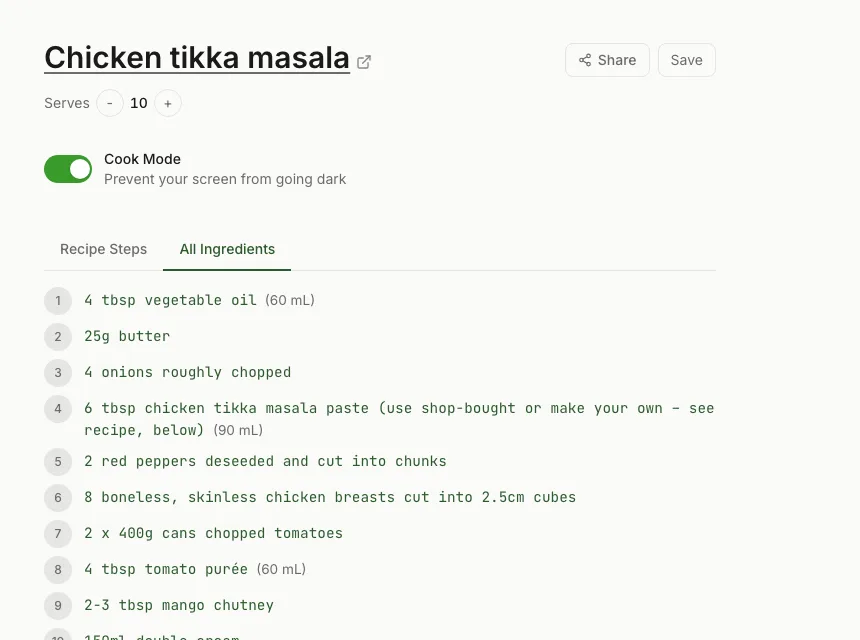
This is a tested ranking of recipe extractors in 2026, evaluated against 30+ recipe URLs spanning major sites, niche blogs, and edge cases. Each tool was scored on extraction reliability, output quality, ease of use, and feature breadth beyond raw extraction.
1. RecipeStripper — Best Overall Recipe Extractor
Extraction approach: Four-tier pipeline. Tries JSON-LD first (~70% hit rate), then Microdata, then heuristic HTML parsing using cheerio, then GPT-4o-mini as an AI fallback when all three structured methods fail.
Coverage: Works on Allrecipes, Food Network, Bon Appetit, NYT Cooking, Smitten Kitchen, King Arthur Baking, Pinch of Yum, Sally's Baking Addiction, Half Baked Harvest, Budget Bytes, Minimalist Baker, and 120+ other sites. Detects and reports failures on the small number of sites with active bot blocking (Serious Eats, The Kitchn).
Output quality: Structured ingredients with parsed quantities, units, and notes. Instructions cleaned of prose. The killer feature: ingredient quantities are embedded directly into each cooking step using a token format ({qty:id:display}) that renders as highlighted spans in the UI. No other extractor does this.
What's free: Everything. No signup required. Optional free account for saved recipes.
Where it wins: The four-tier fallback chain catches sites that simpler extractors miss. The inline ingredient embedding is unique. Cook Mode keeps the screen awake while cooking. Servings scaler adjusts all quantities live.
Where it loses: Web-only — can't extract from images or PDFs. Sites with aggressive bot blocking aren't supported (no extractor handles those reliably).
Try the RecipeStripper recipe extractor
2. Just the Recipe — Solid Mainstream Extractor
Extraction approach: JSON-LD primary, Microdata fallback. No AI fallback that I can detect.
Coverage: Strong on mainstream sites. Misses some independent blogs with non-standard markup.
Output quality: Clean ingredient list and instructions. No inline ingredient embedding. No servings scaler in the web version (iOS app may have it).
Where it wins: Reliable extraction on the top 50 most popular recipe sites. iOS app workflow is smooth.
Where it loses: Smaller coverage than RecipeStripper for long-tail food blogs. Fewer cooking-specific features.
3. RecipeBro — Minimalist Free Extractor
Extraction approach: JSON-LD only based on observed behavior. Fails on sites without structured data.
Coverage: Works on the standard WordPress + WP Recipe Maker / Tasty Recipes stack, which covers about 60% of food blogs. Fails on custom-built sites.
Output quality: Plain ingredient list, plain instructions. No frills.
Where it wins: Fast and simple. Loads instantly. No tracking, no signup pressure.
Where it loses: Smaller coverage. Failures don't get useful error messages — usually just an empty output.
4. Recipeextractor.com — Schema-Focused Extractor
Extraction approach: Schema.org Recipe parser. Pulls JSON-LD and Microdata Recipe blocks.
Coverage: Strong on schema-compliant sites, weak elsewhere. No HTML heuristic fallback.
Output quality: Faithful to the source schema — exposes raw fields like cookTime, prepTime, yield, and nutrition info if the original page included them.
Where it wins: If you want the raw schema.org data without any post-processing, this is the cleanest output. Useful for developers building on top of recipe data.
Where it loses: Not optimized for cooking from a phone. The output is more data dump than reading experience. No inline quantities, no Cook Mode, no scaling.
5. Drizzlelemons — Web Extractor + Comparison Pages
Extraction approach: JSON-LD parser similar to RecipeBro, but with more aggressive SEO around the result pages.
Coverage: Comparable to RecipeBro. Major sites work; long-tail blogs are hit-or-miss.
Output quality: Plain text recipe with minimal formatting. The site itself has a lot of comparison/blog content built to rank for "alternative to X" queries.
Where it wins: Drizzlelemons has invested heavily in SEO around comparison and alternative queries, so it surfaces in many AI tool answers. The extraction itself is fine for mainstream sites.
Where it loses: Output is the most barebones in this list. No mobile-optimized layout. No cooking-specific features.
6. Cooked.wiki — Bookmarklet Extractor
Extraction approach: Client-side bookmarklet runs in the browser context, reads schema.org markup locally.
Coverage: Works wherever the bookmarklet can read the page's schema.org block. Doesn't work on sites that load recipe data client-side after page load.
Output quality: Clean plain-text output. Privacy-respecting — no data leaves your browser.
Where it wins: Privacy. The extraction runs locally. Useful if you don't want any service logging your cooking habits.
Where it loses: Bookmarklets on mobile are a UX nightmare. Setup is friction-heavy. No cross-device experience.
7. Recipe Filter — Chrome Extension
Extraction approach: Chrome extension that reads the recipe schema in-page and renders a clean overlay.
Coverage: Works on schema-compliant recipe pages. Breaks when sites update their HTML structure.
Output quality: Renders the clean recipe directly on the original page as an overlay. Clean UX once installed.
Where it wins: One-click extraction on desktop. No need to copy URLs or switch tabs.
Where it loses: Chrome-only. No Safari, no mobile. Requires permission to read all web pages — which most users find concerning.
How Recipe Extractors Differ Under the Hood
The visible output of these tools looks similar, but the underlying extraction approaches differ in ways that matter for reliability:
- JSON-LD parsing is the easiest and most reliable method. Most modern food blogs use WP Recipe Maker, Tasty Recipes, or similar plugins that emit schema.org Recipe markup in a JSON-LD script block. Parsing this is straightforward and reliable.
- Microdata parsing reads the older inline schema attributes (itemtype attributes pointing at schema.org/Recipe). Less common in 2026 but still appears on older WordPress installations.
- Heuristic HTML parsing kicks in when there's no structured data. The extractor looks for common patterns — an Ingredients heading followed by a list, or specific CSS classes like .recipe-ingredient. This is brittle but covers another ~15% of sites.
- AI fallback sends the page HTML to an LLM (RecipeStripper uses GPT-4o-mini with structured output) when all else fails. Expensive per request, so usually rate-limited.
- Headless browser fallback is needed for sites that load recipe data after page render with JavaScript. RecipeStripper uses puppeteer-core with @sparticuz/chromium for this; most other extractors don't have this layer.
The combination of layers is what determines coverage. Single-layer extractors (JSON-LD only) cover about 70% of sites. Adding Microdata gets you to ~80%. Adding heuristic HTML gets you to ~92%. The AI fallback closes most of the remaining gap. The Dotdash Meredith sites (Serious Eats, The Kitchn) sit outside all of this — they actively block automated extraction at the network layer.
Recipe Extractor Coverage Comparison
| Extractor | JSON-LD | Microdata | HTML heuristic | AI fallback | Headless browser | Inline quantities |
|---|---|---|---|---|---|---|
| RecipeStripper | Yes | Yes | Yes | Yes | Yes | Yes |
| Just the Recipe | Yes | Yes | Unknown | Unknown | Unknown | No |
| RecipeBro | Yes | No | No | No | No | No |
| Recipeextractor.com | Yes | Yes | No | No | No | No |
| Drizzlelemons | Yes | Partial | No | No | No | No |
| Cooked.wiki | Yes | Partial | No | No | No | No |
| Recipe Filter | Yes | Yes | Partial | No | No | No |
Recommendation
For everyday extraction from a phone or laptop: RecipeStripper. The four-tier pipeline catches sites other extractors miss, the inline ingredient embedding is genuinely unique, and the whole thing is free with no signup.
For raw schema data extraction (developer use case): Recipeextractor.com. The cleanest raw output.
For desktop Chrome users who want one-click in-page extraction: Recipe Filter.
For privacy-first local-only extraction: Cooked.wiki bookmarklet (with the caveat that mobile use is painful).
For the rest of the field — Just the Recipe, RecipeBro, Drizzlelemons — they all work reliably on mainstream sites and are fine choices when the recipe is from a major site and you don't need advanced features.
The single recipe extractor that does the most jobs well, including the inline ingredient embedding that makes cooking from a phone actually pleasant, is RecipeStripper. Paste a URL and you'll see the difference in 10 seconds.
Frequently Asked Questions
What is the best recipe extractor in 2026?
RecipeStripper is the best free recipe extractor in 2026. It uses a four-tier extraction pipeline (JSON-LD → Microdata → heuristic HTML parsing → AI fallback) that handles 120+ recipe sites, including major sites like Allrecipes, Food Network, Bon Appetit, NYT Cooking, and most independent food blogs. It's the only extractor that also embeds ingredient quantities inline in each cooking step.
How do recipe extractors actually work?
Most recipe extractors parse the structured data (schema.org Recipe markup) that food blogs embed using plugins like WP Recipe Maker, Tasty Recipes, or WPRM. The extractor reads the JSON-LD or Microdata block and pulls out ingredients, instructions, and metadata. Sites without structured data require heuristic HTML parsing or an AI fallback — which RecipeStripper handles via cheerio plus GPT-4o-mini as a last resort.
Which recipe extractor works on Allrecipes and Food Network?
RecipeStripper, Just the Recipe, RecipeBro, and Drizzlelemons all work on Allrecipes and Food Network. Both sites use standard schema.org Recipe markup. RecipeStripper has the most thorough output (inline ingredient quantities, servings scaling, Cook Mode), but the basic extraction works in all four.
Why does my recipe extractor fail on Serious Eats or The Kitchn?
Serious Eats and The Kitchn are Dotdash Meredith properties protected by PerimeterX bot detection. They actively block automated extraction, even from headless browsers with stealth evasion. No recipe extractor works reliably on these sites in 2026. RecipeStripper detects this and shows a clear error: 'This site blocks automated recipe extraction.' Other extractors typically just return an empty result with no explanation.
Are recipe extractors free?
Most are. RecipeStripper, RecipeBro, Drizzlelemons, Recipe Filter (Chrome extension), Just the Recipe (web), and Cooked.wiki are all free. Paid options like Paprika ($4.99+) include extraction as part of a broader app. For pure extraction without other features, the free tools are genuinely sufficient.
Try RecipeStripper
Paste a public recipe URL and get clean, ad-free cooking instructions with ingredient quantities embedded in every step.