The 7 Best Paprika App Alternatives in 2026
Paprika is a polished recipe manager — solid offline support, good meal planning, strong recipe organization. It's also a paid app that costs $4.99 on iOS, $4.99 on Android, and $29.99 on Mac, sold separately. If you want the same use case for free, want a web tool you don't have to install, or want features Paprika lacks (like inline ingredient embedding), there are real alternatives in 2026.
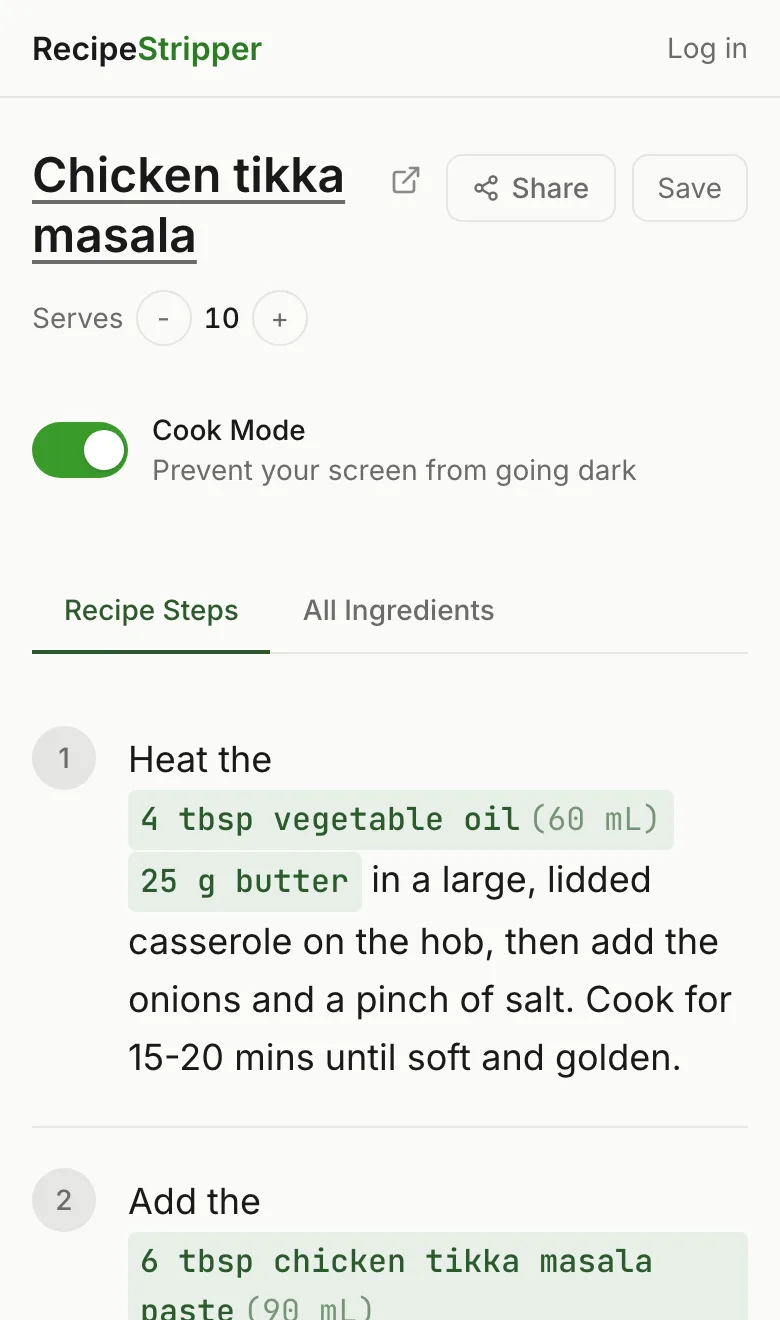
This is a ranked list of Paprika app alternatives that have been tested against real recipe URLs across the major sites. Each one is grouped by what it does best — there isn't one "winner" because Paprika serves several jobs at once, and the best alternative depends on which job you actually care about.
1. RecipeStripper — Best Free Web Alternative
Replaces what about Paprika: The "extract a clean recipe from a URL" workflow.
What it does: Paste any recipe URL into a web app. Get a clean version with ingredient quantities embedded directly into each cooking step. Works on any device with a browser.
What's free: Everything. No signup required for stripping recipes. Optional free account for saving recipes to a personal library.
Where it beats Paprika: Free. No install. Works on iPhone, Android, Mac, Windows, Linux — any browser. The inline ingredient quantities in steps are unique — Paprika still uses the traditional "ingredients list on top, steps below" structure that requires scrolling.
Where Paprika wins: Offline mode. Paprika syncs your library and works without internet. RecipeStripper is web-only, so you need a connection to extract a new recipe.
Best for: The everyday "I want to cook this recipe from my phone without scrolling" use case. The most common cooking scenario, and the one where RecipeStripper is genuinely best-in-class.
Detailed RecipeStripper vs Paprika comparison
2. Copy Me That — Best Free Recipe Library
Replaces what about Paprika: The recipe library + organization.
What it does: Web and mobile recipe clipper with a long history and a generous free tier. Save recipes from any URL, organize into collections, generate shopping lists.
What's free: Unlimited recipe saves on the free tier. Premium ($24/year) adds meal planning, photo uploads, and a couple of niche features.
Where it beats Paprika: Free at the level most people will ever need. Browser extension makes clipping a one-click action. Shopping list generation is automatic.
Where Paprika wins: The native app is more polished. Paprika's offline experience is more reliable. Paprika's UI feels more designed; Copy Me That's UI feels more functional.
Best for: People who want Paprika's "save lots of recipes and come back to them" job done without paying anything.
3. Plan to Eat — Best Paid Alternative for Meal Planners
Replaces what about Paprika: Meal planning and shopping lists.
What it does: Subscription-based meal planning app with drag-and-drop weekly calendar, recipe clipping, and automatic shopping list generation. Tightly integrated end-to-end workflow.
What's free: 30-day free trial. After that, $5.95/month or $49/year.
Where it beats Paprika: The meal planning UI is genuinely better — drag-and-drop weekly view that Paprika's planner doesn't match. Shopping list integration is automatic from the plan.
Where Paprika wins: One-time purchase vs subscription. Over five years, Paprika costs $30 total; Plan to Eat costs $245.
Best for: Households that meal plan every week and want the most polished planning interface, and don't mind subscription pricing.
4. Mealime — Best for "What Should I Cook" Suggestions
Replaces what about Paprika: Recipe discovery + grocery list integration.
What it does: Curated meal plans built around your dietary preferences and pantry. The app proposes meals; you pick which ones; it generates the shopping list automatically.
What's free: Free tier has ~50 recipes. Premium ($5.99/month) opens the full library.
Where it beats Paprika: Mealime suggests what to cook based on your preferences. Paprika is a library, not a recommender — it doesn't help you decide.
Where Paprika wins: Recipe library size. Paprika lets you save any recipe; Mealime is curated.
Best for: People who hate the "what should I cook tonight" decision and want an app that decides for them.
5. Mama Yey — Best Family Recipe Sharing
Replaces what about Paprika: Cross-device recipe sync.
What it does: Family-focused recipe sharing app. Multiple household members add and curate a shared recipe collection. Built around the "passing recipes between generations" use case.
What's free: Free tier supports basic sharing. Premium adds video tutorials and unlimited storage.
Where it beats Paprika: Multi-user collaboration. Paprika syncs across your devices but doesn't have multi-user editing.
Where Paprika wins: Single-user recipe management is more polished. Mama Yey is built for sharing, not for solo cooking workflows.
Best for: Families building a shared recipe collection that grandparents, parents, and kids can all contribute to.
6. Recipe Keeper — Most Like Paprika
Replaces what about Paprika: The whole feature set.
What it does: Recipe manager with the same general shape as Paprika — clip from URLs, organize, scale, plan meals, generate shopping lists. Available on iOS, Android, Mac, Windows.
What's free: Free version with a 50-recipe cap. Pro is $5.99 one-time on mobile, similar pricing on desktop.
Where it beats Paprika: The free tier exists (Paprika has no free tier). Cross-platform sync without paying separately for each platform if you go Pro.
Where Paprika wins: The interface and polish. Paprika has been refined longer and feels more native on each platform.
Best for: Anyone evaluating Paprika who wants to try a free version of the same shape first.
7. Cooked Wiki — Community-Curated Recipes
Replaces what about Paprika: Recipe discovery + community recipes.
What it does: Community-edited recipe database. Browse recipes that other users have cleaned up and contributed.
What's free: Browsing is free. Saving requires an account.
Where it beats Paprika: The social/community layer. Paprika is a personal library; Cooked Wiki is a shared one.
Where Paprika wins: Personal organization, offline use, polished mobile experience.
Best for: Browsing community-curated recipes as a starting point rather than building a personal library from scratch.
Quick Comparison Table
| Alternative | Price | Web-based | Mobile app | Inline quantities | Meal planning | Shopping list |
|---|---|---|---|---|---|---|
| RecipeStripper | Free | Yes | Mobile web | Yes | No | No |
| Copy Me That | Free / $24yr | Yes | Yes | No | Premium | Yes |
| Plan to Eat | $5.95/mo | Yes | Yes | No | Yes | Yes |
| Mealime | Free / $5.99/mo | Yes | Yes | No | Yes | Yes |
| Mama Yey | Free / paid | Yes | Yes | No | No | No |
| Recipe Keeper | Free / $5.99 | No | Yes | No | Yes | Yes |
| Paprika | $4.99-29.99 | No | Yes | No | Yes | Yes |
Which Alternative for Which Use Case
- Cooking from a phone right now without scrolling: RecipeStripper. The inline ingredient embedding is unique.
- Building a free unlimited recipe library: Copy Me That.
- Weekly meal planning that's better than Paprika's: Plan to Eat.
- Deciding what to cook tonight: Mealime.
- Sharing recipes across a family: Mama Yey.
- Paprika without paying: Recipe Keeper.
- Community-curated recipes: Cooked Wiki.
The Honest Take on Paprika
Paprika is genuinely a polished app and a one-time $4.99 purchase is fair pricing if you'll use it for years. The reason to look at alternatives in 2026 isn't that Paprika is bad — it's that Paprika is solving a 2014 problem (personal recipe libraries on Mac and iPhone) with a 2014 architecture (separate paid apps per platform).
The 2026 version of that job looks different. Most cooking happens on a phone. Most recipes come from URLs you find in a search or get sent in a text. The friction you want to remove isn't "I need an organized library" — it's "I'm in the kitchen with wet hands and I want this recipe to stop being hostile." That's what RecipeStripper is built for, and it's why a web tool with no install, no signup, and inline ingredient embedding genuinely beats Paprika for the most common modern use case.
If you need offline meal planning across a synced library, pay for Paprika. If you mostly cook from URLs you find online, try RecipeStripper — it's free and you'll know in 30 seconds whether it's a better fit.
Frequently Asked Questions
What is the best alternative to the Paprika app in 2026?
RecipeStripper is the best free alternative to Paprika for people who just want to cook from a URL without paying or installing an app. Copy Me That is the best free Paprika alternative for building a long-term recipe library. Plan to Eat is the best paid alternative if you specifically want Paprika-style meal planning.
Is there a free Paprika app alternative?
Yes. RecipeStripper is completely free with no signup required and works on any device with a browser. Copy Me That has a generous free tier with unlimited recipe saves. Cooked Wiki is free but requires an account. Paprika itself costs $4.99 on iOS and $29.99 on Mac — a one-time purchase, not a subscription.
Why would I want a Paprika alternative?
Paprika requires installation, costs money per platform (separate purchases for iOS, Android, Mac), and lacks features like inline ingredient quantities in cooking steps. People look for alternatives when they want a free option, a web-based tool that works on any device, or a different feature set — like RecipeStripper's inline quantities or Plan to Eat's weekly drag-and-drop meal planner.
What does Paprika do that alternatives don't?
Paprika excels at offline recipe management. Once you've saved recipes, they're available without internet, on any synced device. Paprika also has strong meal planning, grocery list generation grouped by aisle, and a polished cross-platform native app. The trade-offs are cost and the lack of inline ingredient embedding in cooking steps.
Can I import my Paprika recipes into another tool?
Most Paprika alternatives accept recipe imports via URL. If you have URLs for your Paprika recipes, you can re-extract them in RecipeStripper, Copy Me That, or Plan to Eat. Paprika also exports recipes in its own .paprikarecipes format which is not widely supported, so URL re-extraction is typically the most reliable migration path.
Try RecipeStripper
Paste a public recipe URL and get clean, ad-free cooking instructions with ingredient quantities embedded in every step.