Cook Mode for Recipes
Keep your recipe readable while you cook. RecipeStripper turns public recipe pages into clean steps with inline quantities, then Cook Mode keeps the screen useful at the counter.
Try Cook Mode from any public recipe URL
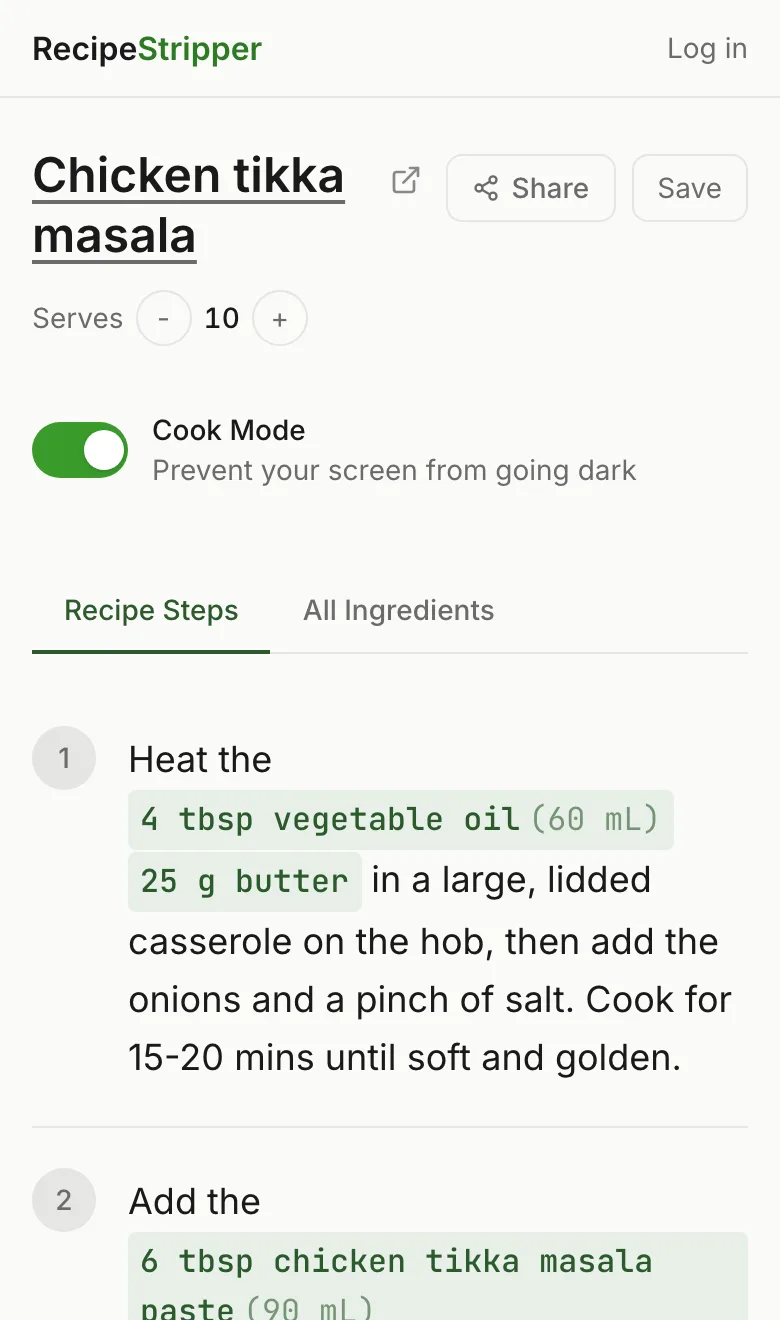
Built for the Counter
A normal recipe page assumes you are sitting at a desk with clean hands. Cooking is different. Your phone is propped against a jar, the screen dims mid-step, and a tiny link or sticky ad is hard to hit when your hands are wet.
Cook Mode removes that friction. The recipe is already stripped down to ingredients and instructions, and the active cooking view is optimized for reading one step at a time.
What Cook Mode Helps With
- ✓Screen wake lock keeps the display awake when the browser supports it
- ✓Large step controls are easier to tap from the counter
- ✓Inline ingredient quantities reduce back-and-forth scrolling
- ✓The clean view removes ads, pop-ups, sticky video, and recipe-page clutter
- ✓Servings scaling updates ingredient quantities before you start cooking
Frequently Asked Questions
What is Cook Mode in RecipeStripper?
Cook Mode is a recipe-reading mode designed for a phone on the kitchen counter. It keeps the screen awake when the browser supports the Screen Wake Lock API and presents instructions as large, focused steps.
Does Cook Mode work on iPhone and Android?
Cook Mode works in modern mobile browsers that support screen wake lock. If a browser blocks wake lock, RecipeStripper still shows the clean recipe view and step controls; only the screen-awake behavior falls back to the device default.
Why is Cook Mode useful?
Most recipe pages are hard to use with wet or messy hands. Cook Mode reduces scrolling, keeps each step readable, and pairs instructions with inline ingredient quantities so you do not need to jump back to the ingredient list.